Monday, February 8, 2016

Create Your Own Branded Favicon

What are Favicons?

Ever notice that some websites have neat little custom icons next to them in your browser tabs when you load them up?


These icons add an element of unique branding to websites, giving them a professional appearance. 

They're known as favicons.


Favicons are literally "favorite icons" - short for when bookmarks for websites were called "favorites".  They are very small (usually 16 x 16 pixels). In addition to appearing in the address bar, favicons also appear in browser tabs, bookmarks, and the links bar.

How do you Create Favicons?

Traditional favicons are saved in the ICO graphic file format (used for old school Windows icons). Photoshop used to be able to save to this format, but no longer does. Not to worry - just create a 16x16 pixel GIF or PNG and use the icon utility ConvertIcon.


There are even online tools like favicon.cc or the favicon generator to help you create and save them.  


A newer type of icon is the Site Icon, used by WordPress. The Site Icon can be a PNG or GIF up to 512 x 512 pixels. Once uploaded, WordPress automatically creates a favicon, along with many other icon sizes in between for various mobile devices.

Once you have your custom 16x16 favicon in the ICO format (or 512x512 Site Icon), here are some instructions on how to get them working on your site or blog:

Favicons on websites

Favicons can be hand coded into any HTML file with a single line of code in the HEAD section:


However, doing this for every page in a site is tedious and prone to inevitable error. An easy workaround is that most browsers will automatically look for a file called favicon.ico at the root level of your site. If you simply copy your favicon file to your root level, you should be good to go.

Favicons on Blogger blogs

Easy. Go to the Blogger admin page and click on Layout. You'll see on the top left of your layout an area called Favicon where you can upload your ICO file by clicking on "Edit".


Site Icons on Wordpress blogs

Wordpress users have it a little easier - they can use PNG or GIF files that are 512 x 512 pixels. Wordpress will resize as needed. Just go into Appearance / Customize in your Wordpress admin page. Most themes will allow you to customize your "Site Identity" which includes a custom site icon. Just click on "Select Image" and upload your 512 x 512 PNG or GIF image. Wordpress takes care of the rest.


Now that you know what favicons are and how to create them - why don't you make one for your blog?

Wednesday, December 30, 2015

Social Media Project Roundup, Fall 2015

Every semester, my UNI Digital Advertising students work very hard on a massive project: To develop a professional brand based on their personal interests using social media. 

Let's take a moment to praise their work and note a few special honors.

The Big Picture

It's always astounding to me what my classes can accomplish in little under three months.  By measuring our activity and engagement on social media, we can quickly evaluate our performance with quantitative metrics.

From early September through November 18, 2015, my 43 #unidigadv students accomplished the following:
  • Posted a total of 6,066 tweets on Twitter
  • Gained a total of 5,691 followers on Twitter
  • Earned an average score of 44 on Klout
  • Added 2,471 connections on LinkedIn
  • Published 397 blog posts on Blogger or WordPress blogs
  • Earned 35,565 pageviews from 11,733 visitors to their blogs

    TWITTER

    Most Prolific
    Tweeting is one of those things that seems very easy at first glance - until you do it every day in support of a professional brand.  That's hard work!  Here are the top five #unidigadv Tweeps by Tweet volume (I only counted original tweets for this - retweets did not count!):
    1. Christian Nichols @SpawnCampGaming - 258 Tweets
    2. Ryan Smith @DestinyReveal - 229 Tweets
    3. Matthew Moody @onevideogameguy - 223 Tweets
    4. Staci Langel @markithealth - 199 Tweets
    5. Eldina Siljkovic @BasicallyHID - 186 Tweets
       
    Most Followers Gained
    If you want to wield influence on Twitter, you need followers.  Here are the students who added the most followers during the semester.
    1. Griffin Kuntz @StrongFarms - added 1,146 followers (Record Breaker!)
      This is a class record for a personal brand!
    2. Spencer Moser @ComposerMoser - added 393 followers
    3. Tyler Meier @GamerGuyTy - added 322 followers
    4. Morgan Sanders @PrintsFuture - added 264 followers
    5. Valerie Yeltman @DrupalNewb - added 222 followers
       

    LINKEDIN

    Most Connections Gained
    When job hunting, who you know is often as important as who you are.  Here are the class members who gained the most connections on LinkedIn during this project:
    1. Rhydian Talbot +226 connections
    2. Taylor Aitchison +171 connections
    3. Spencer Moser +150 connections
    4. Brandon McConnell +128 connections
    5. Griffin Kuntz +105 connections
    Most Overall Connections
    Some students already had a huge network of professional contacts on Linkedin. Here are the most well-connected class members overall:
    1. Griffin Kuntz - 866 connections
    2. Austin Hansen - 487 connections
    3. Taylor Aitchison - 453 connections
    4. Rhydian Talbot - 418 connections
    5. Jake Schmidt - 377 connections
    Highest Quality Profiles
    Working to build a high quality Linkedin Profile can help you stand out to potential employers.  The following students all had excellent quality profiles:
    Most Recommended
    These three students had the greatest number of recommendations by others on LinkedIn:


    BLOGS

    The real content was being generated on student blogs, where students developed unique and original posts related to their professional brand.  They then attempted to organically attract an audience of readers - a difficult challenge!

    Most Visited Blogs 

    We had SEVEN students who earned over 1,500 pageviews to their blog during the course of the semester - they did a fantastic job attracting and engaging their visitors.  Browse through their blogs and see what they came up with:
    1. Rhydian Talbot - Campus Chripsters - 2,307 pageviews
    2. Isak Knivsland - DIY Isak - 2,106 pageviews 
    3. Spencer Moser - Composer Moser - 2,024 pageviews
    4. Taylor Aitchison - California Dreams Marketer - 1,751 pageviews
    5. Valerie Yeltman - Drupal Newb - 1,591 pageviews
    6. Morgan Maiers - The Next Chapter - 1,582 pageviews
    7. Griffin Kuntz - Strong Farms - 1,575 pageviews

    Special Honors

    Most Integrated Brand
    Christian Nichols - Spawn Camp Gaming
    Christian's impressive brand (offering news about the video game industry) integrated not only his Twitter profile, but also his custom YouTube channel, his Twitch channel, and a custom Facebook page. The Spawn Camp Gaming site had its own URL and is nicely integrated across a variety of social channels.

    Strongest Writing
    Rhydian Talbot - Campus Chripsters
    Rhydian is a master of verbiage, and her blog on Christian Hipsters (Chripsters) offers some of the most playful and well-crafted copy you will read. 

    Best Design
    Dana Potter - Redder
    For a blog about color theory in interactive design, one would expect nothing less than the beautifully crafted design of Redder. It also contained excellent posts on color and UI design.

    Most Resonant Brand
    Griffin Kuntz - Strong Farms
    Griffin's authentic understanding of farming and ability to connect and inspire other farmers on Twitter created a strong brand that delivered strong results. Earning over 1,100 Twitter followers also set a new class record for a personal brand. 

    Best Personal Brand Logo
    Jake Sweezy - DJ Sweezy
    It's techno - it's fun.  I love it!


    Best Sports Brand
    Austin Eller - The Money in Sports
    A lot of students like the idea of a sports-related blog, but few can find a truly unique focus that is different than everything else out there. By using his background in Finance to look more closely at the financial aspects of sports, Austin found a niche that is a real winner.

    Most Helevant Blog
    Isak Knivsland - DIY Isak
    "Helevant" is a term I coined that means both helpful and relevant. Sort of like "hella relevant". Isak's blog offered helpful and relevant production tips on sampling beats and creating EDM/hip hop tracks that were excellent for a beginner, often incorporating many original examples embedded in each post as sound clips. This is the type of blog that is sure to earn hundreds (if not thousands) of additional pageviews in the coming years due to organic search traffic.

    Most Poetic Blog
    Aaron Sprengeler - Clasp
    Aaron's blog was a showcase for his poignant animated GIFs (cinemagrams) and thought-provoking creative writing. Note that the load time is a little slow due to the large GIF files.

    Biggest Win
    Morgan Sanders - Print's Future
    When she started her project, Morgan was full of anxiety about her topic. "What do I know about the future of the print industry?", she worried. After putting a lot of work into her Twitter presence and blog, Morgan was contacted by a company that specializes in social media marketing for companies involved in the print industry. They offered her a job based on her work on this project!

    Thanks again for a great semester - if you get nostalgic you can always tune into #unidigadv on Twitter and help the newbies out!

    Did you have a favorite blog this semester that I didn't mention?  Tell me about it in the comments!

    Monday, September 21, 2015

    Embedding Social Content into Your Blog Posts (Part 1 - Tweets)

    One of the powerful aspects of social content is that it is portable - that is, it can be easily shared and republished in a variety of ways.  Whether it is an Instagram photo or a Tweet, this content is designed to be shared as a social object.

    This series of posts will take a look at commonly shared social objects (Tweets, FB posts, YouTube videos, etc) and how they can be embedded in blogs or websites in their native format. Let's start with Tweets.

    Embedding Tweets on Websites and Blogs


    Twitter content is perfect for sharing.  Tweets are usually concise thoughts that are short and to the point.  They can quickly summarize a person's point of view, opinion, or outlook without getting too detailed.

    You can easily screen-capture a tweet and include it in your blog as an image, but if you want to give readers an easy way to favorite, retweet, or reply to the tweet right from your blog page, you'll want to embed it.

    Every tweet has a "More" menu accessible by clicking on the button with the three dots that appears at the end of the tweet.  Go to this menu and select "Embed Tweet".


    This will give you a snippet of custom code that can be added to a website or blog.  To get this code, simply copy it from the "Embed this Tweet" dialog box and close it.


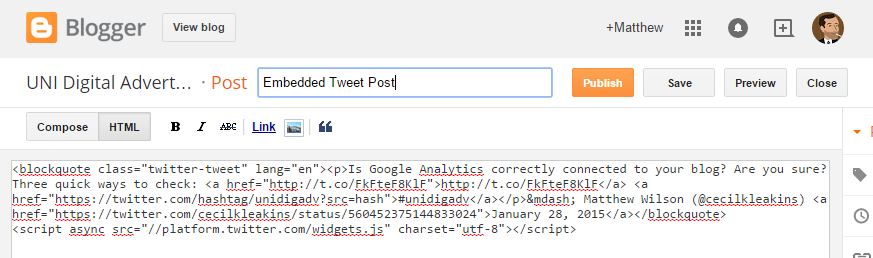
    To embed this tweet in a Blogger post, simply create a new post (or edit one you've already started), select "HTML" editing mode, and paste the code from Twitter.


    You can similarly embed a tweet in another content publishing tool (WordPress, a website, etc) by pasting it into your HTML code.

    Here's an embedded tweet to show you how this content appears in a Blogger post:
    Notice how you can reply, favorite, or retweet the content right from this page?  Any links or hashtags are also clickable.  MUCH more functional than a screenshot.

    Embedding Tweets in Facebook Posts
    This method will NOT work as a way to embed tweets in other social media content.  Here is what happened when I tried to use this embed code in a Facebook post:


    Facebook does not allow HTML markup tags within status updates, so the code appeared exactly as it is.  

    For more info on embedding Tweets, see this Twitter Help Center article.


    Stay tuned for part 2 of my series, where I'll discuss embedding Facebook content in blog posts!


    Friday, May 1, 2015

    Social Media Project Roundup, Spring 2015

    Every semester, my UNI Digital Advertising students work very hard on a massive project: To develop a professional brand based on their personal interests using social media. 

    Unfortunately, after the Spring semester in 2015 I neglected to post a "roundup" article on all of my student work that semester. After multiple requests from students, I am finally posting this now!

    With that said, let's take a moment to praise their work and note a few special honors.

    The Big Picture

    It's always astounding to me what my classes can accomplish in little under three months.  By measuring our activity and engagement on social media, we can quickly evaluate our performance with quantitative metrics.

    From January through April 2015, my 47 #unidigadv students accomplished the following:
    • Posted a total of 7,733 tweets on Twitter
    • Gained a total of 6,799 followers on Twitter
    • Earned an average score of 46 on Klout
    • Added 3,792 connections on LinkedIn
    • Published 477 blog posts on Blogger or WordPress blogs
    • Earned a record-breaking 91,763 pageviews on their blogs

      TWITTER

      Most Prolific
      Tweeting is one of those things that seems very easy at first glance - until you do it every day in support of a professional brand. Here are the top five #unidigadv Tweeps by Tweet volume (Note: I only counted original tweets for this - retweets did not count!):
      1. Patricia Zubrod @TrishZubrod - 326 Tweets
      2. Nick Nielsen @12nnielsen - 311 Tweets
      3. Morganne Murphy @trekkintraveler - 184 Tweets
      4. Casey Roegner @StayIowan - 172 Tweets
      5. Kara Schemmel @glutenisnotme - 158 Tweets
         
      Most Followers Gained
      If you want to wield influence on Twitter, you need followers.  Here are the students who added the most followers during the semester.
      1. Emily Nibaur @GrabUrPopcorn - added 367 followers
      2. Danyang Wang @AuroraDreammask - added 261 followers
      3. Taylor Conger @_FEMvertising - added 257 followers
      4. Autumn Alitz @autsblog - added 162 followers
      5. Melissa Wulfekuhle - @nutrifit2015 - added 161 followers
         
      Most Klout
      Klout measures your social media influence. It is a decent measure of engagement over all of the social channels we utilized in class. Here are the highest scorers:
      1. Daniel Vorwerk - Klout score: 64
      2. Keevin O'Rourke - Klout score: 60

      LINKEDIN

      Most Connections Gained
      When job hunting, who you know is often as important as who you are.  Here are the class members who gained the most connections on LinkedIn during this project:
      1. Tucker Collins +282 connections
      2. Tony McDermott +169 connections
      3. (tie) Scout Morehouse +158 connections
               Sean Ford +158 connections
      4. Morganne Murphy +157 connections
      Most Overall Connections
      Some students already had a huge network of professional contacts on Linkedin. Here are the most well-connected class members overall:
      1. Grant Zieser - 497 connections
      2. Daniel Vorwerk - 423 connections
      3. Tim Luchtefeld - 429 connections
      4. Mitchel Christoffel - 357 connections
      5. Mike Caraway - 353 connections
      Highest Quality Profiles
      Working to build a high quality Linkedin Profile can help you stand out to potential employers.  The following students all had excellent quality profiles:
      Most Recommended
      These three students had the greatest number of recommendations by others on LinkedIn:


      BLOGS

      The real content was being generated on student blogs, where students developed unique and original posts related to their professional brand.  They then attempted to organically attract an audience of readers - a difficult challenge!

      Most Visited Blogs 

      We had EIGHT students who earned over 2,000 pageviews to their blog during the course of the semester - they did a fantastic job attracting and engaging their visitors.  Browse through their blogs and see what they came up with:
      1. Amanda Hackenmiller - The Busyy Beauty - 30,757 pageviews
      2. Andrew McIlleny - True Motorsports Enthusiast - 6,993 pageviews 
      3. Grant Zieser - Life After ISU - 4,283 pageviews
      4. Brittany Bunger - Fashion Gives Back - 1,751 pageviews
      5. Daniel Vorwerk - Coffee Snobs - 2,943 pageviews
      6. Haley Rahe - My Sister's Closet - 2,371 pageviews
      7. Nick Nielsen - Pop Star Social - 2,267 pageviews
      8. Amanda Mcavoy - Iowa Brewtiful - 2,080 pageviews

      Special Honors

      Most Viral Blog Post
      Mandy Hackenmiller - "15 Things I Learned in College" (Record Breaker!)
      Mandy's personal brand was called The Busyy Beauty and focused on health and beauty tips for those on a busy schedule.  Her blog received fairly decent traffic - around 1,000 pageviews - that is, up until April 6, 2015.  Close to the end of the project, she tried something a little different and more personal in nature - a list article about the life lessons she learned in college.  

      Perhaps due to the time of year - as many across the country were preparing to graduate high school or college - Mandy's post went viral. Big time. In the course of seven days following the publication of her blog post, her blog received 29,132 pageviews!

      Second Runner up: 
      Andrew blogged all semester about the automotive enthusiast world - but only garnered a few hundred pageviews. The week before the project was due he wrote an lengthy opinion piece on his favorite 4 cylinder engine: the Mitsubishi 4g63. Sharing it with a few Facebook groups of passionate gearheads earned Andrew over 6,500 pageviews in less than a week!

      Best Interviews
      Nick Nielsen - Pop Star Social interviews with Kingsley and Misty Kingma
      Nick landed some serious interviews for his blog on social media and celebrity culture with Youtube personalities Kingsley and Misty Kingma. With millions of subscribers between them, it demonstrates the strength of Nick's personal brand that he was able to earn exclusive personal interviews with them.

      Best Entrepreneur Blogs
      Keevin O'Rourke - The Startup Students
      Michael Caraway - How 'Bout Now (HBN)
      Keevin and Michael are entrepreneurs who are themselves involved in a startup. They both wrote blogs targeting student entrepreneurs to give advice, tips, and helpful perspective to those considering starting their own business as a student. Their blogs were both well-designed and well-written - providing great content that was a pleasure to read.

      Best Advertising Blog
      Taylor Conger - Think Like a Girl
      Taylor wanted to empower women by critically examining "femvertising" - advertising that is targeted to women. Her writeups on women's issues and brands that try (successfully or unsuccessfully) to connect with women through their advertising were both cogent and timely.

      Thursday, January 29, 2015

      Two Essential Plugins for Your Wordpress Blog

      Tracking the traffic to your blog and optimizing it for Search Engines and Social Media shares is extremely important.  These are things that you're going to want to set up as soon as you can.

      In the old days, changes to websites for SEO purposes (like customizing title tags and meta tags) and connecting Google Analytics were a matter of customizing the website's code by hand.  

      Today, Wordpress users have the benefit of being able to install and use powerful plugins to extend and enhance their blog's capabilities without the need to code by hand.  These plugins offer a simple user interface that is easy to use.

      If you are interested in tracking activity on your blog with Google Analytics or optimizing your blog for search engine rankings and social media sharing, there are two essential Wordpress plugins you should consider using on your blog:


      1. Google Analytics Plugin by Yoast
      This plugin ostensibly simplifies the process of installing and monitoring Google Analytics from Wordpress.  

      After creating your Google Analytics account, you simply install the plugin in Wordpress and authenticate with your google account as described here.  That's pretty much it!


      2. Wordpress SEO Plugin by Yoast
      This powerful plugin can handle SEO duties as well as Open Graph tags for Social Media Optimization.

      Follow installation instructions and then take a look at their very informative Guide to Higher SEO Rankings for WordPress sites for more information on setting it up.

      Compared to more stripped-down blogging platforms like Blogger, you'll find that the functionality in the SEO Plugin is pretty comprehensive - not only can you customize your Title and Meta Description tags, but you can even enable Open Graph Protocol tags to handle social media optimization.

      You'll find a ton of other features in this plug-in that you can configure - and if you're someone who finds SEO fascinating - I encourage you to explore this plugin and see what it can do!